
8. Connectivity and privacy
Not every internet connection is secure. Which networks should you avoid and how can you stay private online?
Did it happen?
Igor is 38 years old and works as a clerk in the social welfare department of the regional office. He spends a lot of time on trips and business trips. He is diligent. He works on his laptop at stations, on trains or in cafes. He usually uses public Wi-Fi networks in the area. This way he handles emails or sends internal documents if necessary. Igor was surprised when the angry director of the department summoned him to explain. One of the applicants for care allowances found sensitive documents about himself and his family published on an online repository and came to complain. Igor could not explain the situation, he was sure that he would not publish anything so carelessly.
Public Wi-Fi networks
The purpose of public Wi-Fi networks, which do not require a password to connect, is to provide guests in a café with fast and convenient access to the Internet. However, the openness of these networks is also their weakness. They are truly open to everyone. A technically savvy user can easily monitor what we do on the network and what we send. If such a network is set up directly by an attacker and named “cafe-on-the-corner”, he is done. Public Wi-Fi networks are more used to find out when the train is running or until what time the pastry shop is open. When we have to use a public Wi-Fi network, it is better to avoid sending any login details. If we have to log in somewhere, it is necessary that the given page has the HTTPS protocol.
How come Wi-Fi has a password?
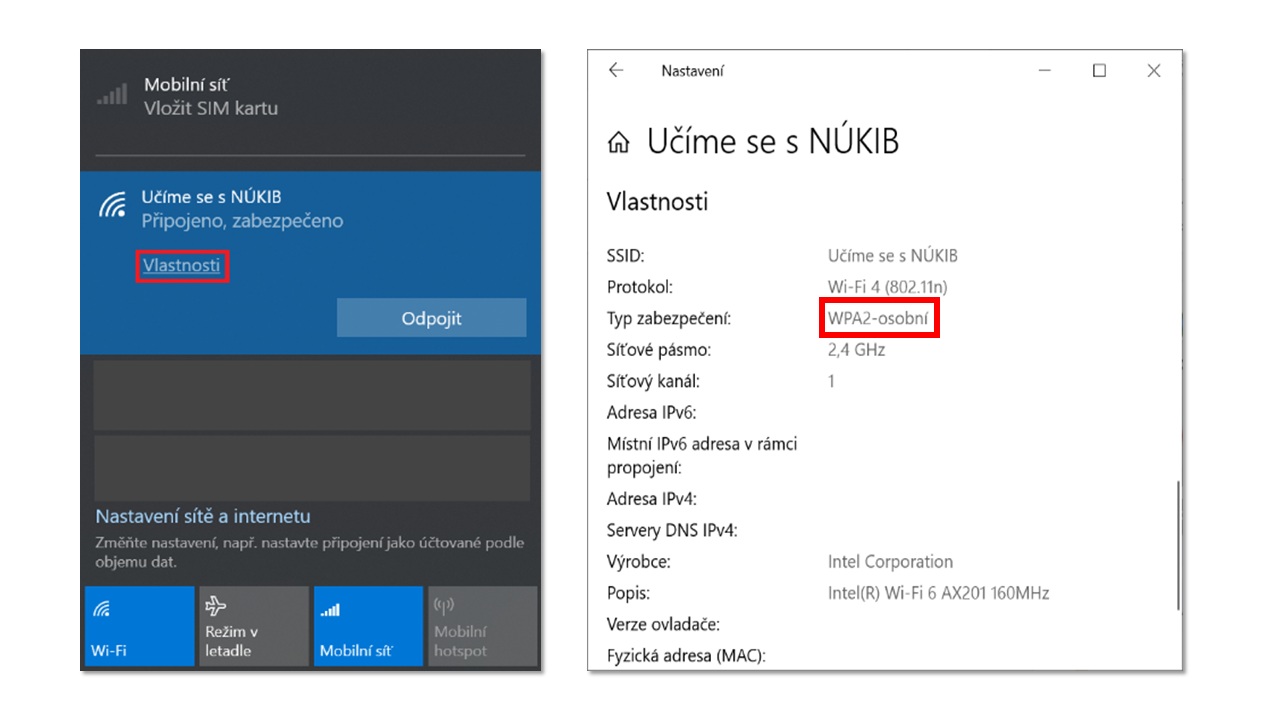
If Wi-Fi has a password, it means that data is transmitted in encrypted form between our device and the device that transmits the Wi-Fi signal. But it is not true that this is automatically sufficient security. It depends on how the encryption is set. Some types of encryption are already outdated. This means that they can be broken and someone can still monitor what we do on the Internet. It is optimal if at least WPA2 encryption is set.
Ilustrační obrázek ukazuje nastavení Wi-Fi sítě, jejíž šifrování lze označit za silné.
Source: NUKIB
Will incognito browsing mode help me on public Wi-Fi?
It won’t help. Don’t be fooled by the term “anonymous”, we are no more anonymous than when browsing normally. The only difference is that our web browser doesn’t store a history of what we did and what we looked at. Nothing actually changes when it comes to the internet. The anonymity of browsing ends in our browser. Anonymous mode will only help us by preventing the web browser from telling us what gift we were looking for, etc.
What is anonymous mode good for from a cybersecurity perspective?
Incognito mode is good if we are on a device that someone else trusts and from which we want to log in to our services. Incognito mode has the advantage from a cybersecurity perspective that it does not remember our login details and logs us out of the service after we close the browser window. Another advantage is that if we make a mistake and enter our password in the username field, our password will not be displayed in the prompt.
HTTPS protocol
The HTTPS protocol also monitors user privacy. A website with HTTPS tells us that the communication between the site and our web browser is encrypted. That it is readable only by us and the website. We can see HTTPS as part of the address bar, for example: https://nukib.cz. A lock symbol is also associated with HTTPS. If someone were to follow us, for example on a public Wi-Fi network in a cafe, they could find out that we went to the page https://moje-bankovnictvi.cz, but that’s it. HTTPS is therefore important for websites where we log in or pay with a credit card. Current web browsers no longer emphasize HTTPS, and locks are gradually disappearing. It is perceived as the norm. In the future, users will only be warned about websites that do not have HTTPS.
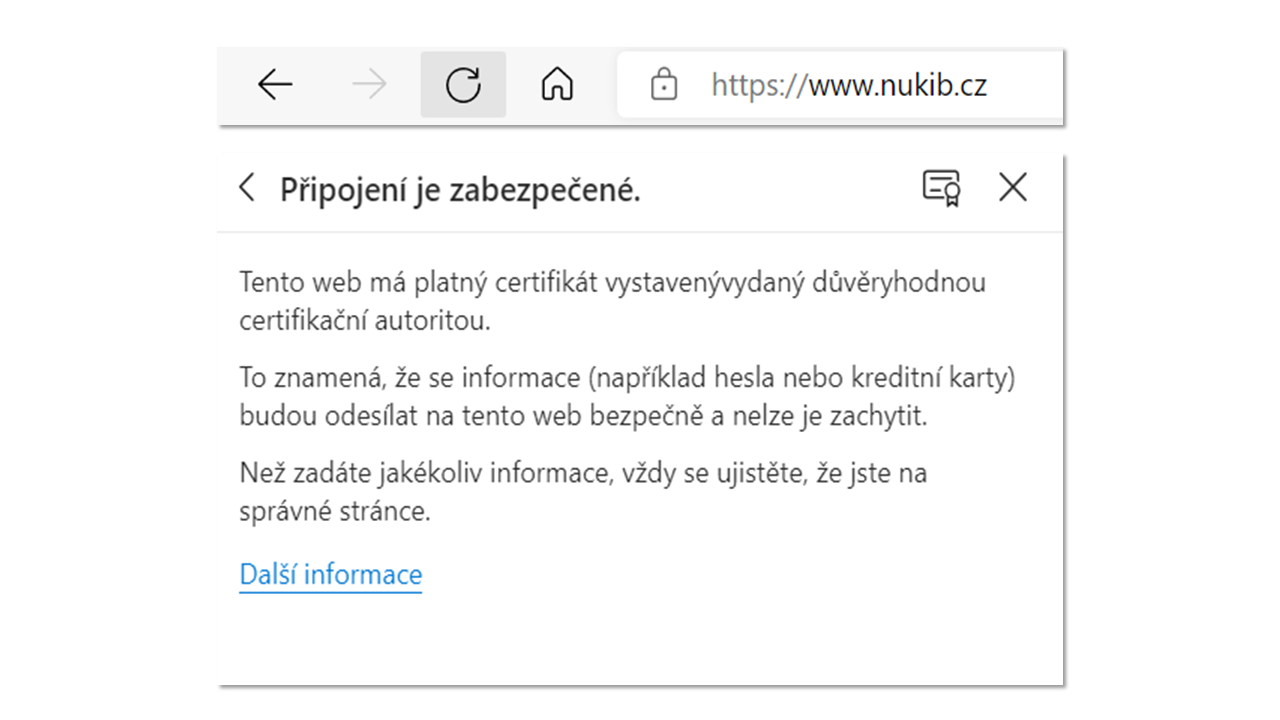
Ilustrační obrázek ukazuje symbol zámečku, https a základní popisek certifikátu, který je s HTTPS spojený.
Source: NUKIB
Can attackers exploit HTTPS in any way?
Yes, it can. It has been mistakenly instilled in users that a website with HTTPS is perfectly secure. This is not true. HTTPS does not guarantee that the content of the website we visit is not malicious in itself. Nor that the page is not fake. The attackers thought that paradoxically they would be better off catching users with a fake website filled with malicious content that has HTTPS. Precisely because of the myth that circulates around HTTPS.
End-to-end encryption (also end-to-end encryption)
End-to-end encryption is of great importance in online communication, and is used for communication between users. Sent messages with end-to-end encryption, including images and files, can only be read by their sender and recipient. No one between them. Not even the operator of the service through which they communicate. But be careful. Not all communication tools use end-to-end encryption. Classic SMS does not use end-to-end encryption. Email boxes, which we can set up for free, usually do not use end-to-end encryption. In email clients such as Outlook, it is possible to set up end-to-end encryption, but for it to work, both the recipient and sender’s client must be able to use it. Some messengers use this encryption, some claim to use it, some do not. When choosing communication tools, it is a good idea to find out whether they offer end-to-end encryption.
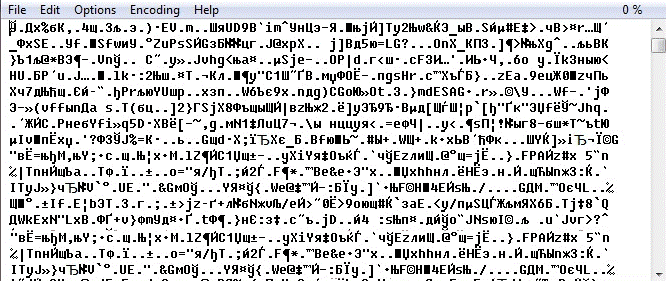
Ilustrační obrázek ukazuje, jak může vypadat zašifrovaná zpráva pomocí koncového šifrování. Takto zprávu vidí někdo, kdo ji dokáže zachytit, ale nedokáže ji přečíst.
Source: dvojklik.cz/k-cemu-je-sifrovani-a-sifrovana-komunikace-na-internetu/
VPN (also known as virtual private network)
A service that ensures a user’s maximum private connection to the Internet is called a VPN. We can imagine a VPN as an encrypted tunnel. Everything we do and send on the Internet passes through this tunnel and is unreadable to attackers. They cannot spy on it. Our connection to a public Wi-Fi network in a café also enters the tunnel. We mentally separate ourselves from public Wi-Fi. It’s like buying a ticket to a private box at a theater. We are in the theater, using its facilities, but we are on the sidelines and have privacy. We often encounter VPNs at work, when the IT department sets them up. We can then remotely access shared work drives or the filing service from home or on a business trip. VPNs were originally created for this purpose.
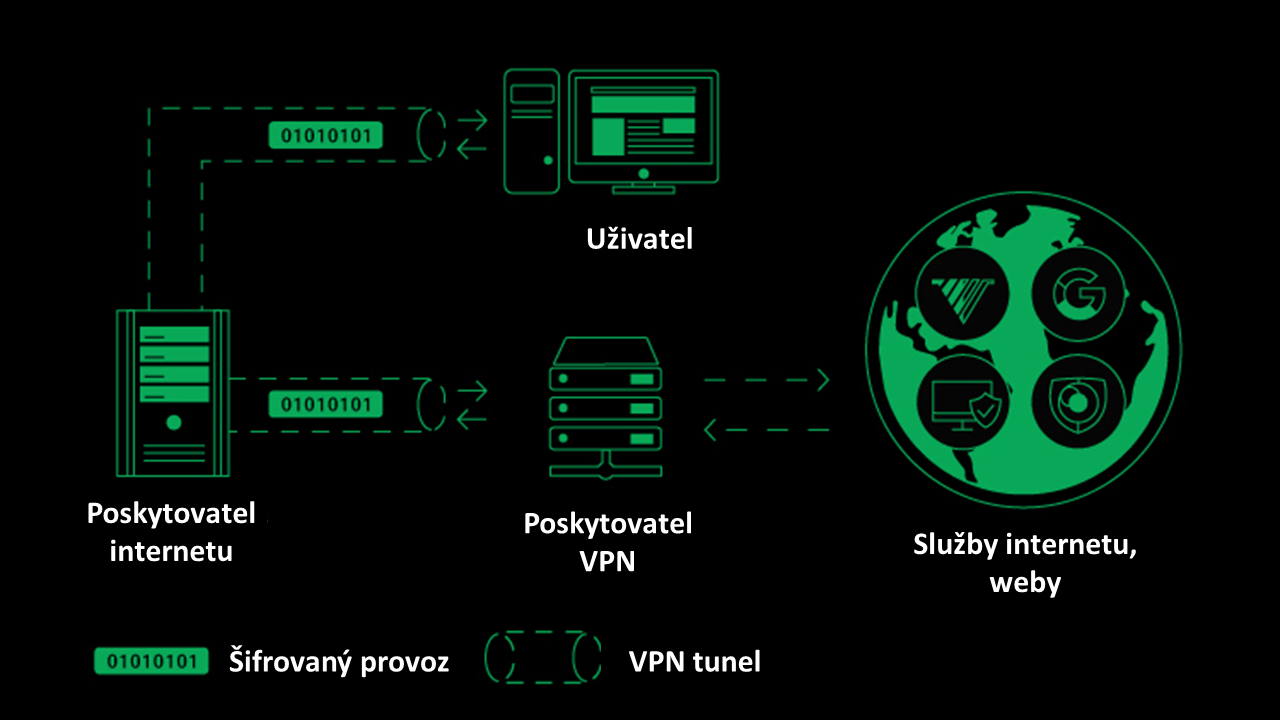
Ilustrační obrázek ukazuje, jak funguje VPN. Komunikace od nás k poskytovali VPN (a obráceně) je šifrovaná. Dále do internetu za nás vystupuje poskytovatel VPN, který nás směrem do internetu jako zastupuje.
Upraveno, původní zdroj: cybernews.com/what-is-vpn/
What is the difference between a VPN and end-to-end encryption?
End-to-end encryption is used to encrypt communication. It encrypts messages between the sender and the recipient. VPN encrypts our internet connection and everything that flows through it. It encrypts communication between our device and the VPN provider’s device. The VPN provider acts as our disguised double on the internet. The two technologies do not replace each other, they complement each other.
How do I get a VPN for personal use?
Every user can easily purchase a VPN themselves. It’s a matter of a few clicks. All you need to do is read reviews and choose a trusted service provider. The service is typically charged in the order of hundreds of crowns. We then log in to the VPN like any other service, which activates the encrypted tunnel. There are also free options, but they are often lacking in functionality or credibility. The credibility and reputation of the provider is key for a VPN.
Pocket puller
| 1. Public Wi-Fi networks | 2. HTTPS | 3. End-to-end encryption | 4. VPNs |
| Public Wi-Fi networks without a password should only be used for basic tasks. For example, to find opening hours or public transport departures. It is better not to send login details using them. | HTTPS tells us that the communication between our web browser and the website is encrypted. However, it does not mean that the site is perfectly secure under all circumstances. | End-to-end encryption is primarily used to encrypt messages. This encryption ensures that only the sender and recipient can read them. Not all communication applications support this encryption. | A VPN works like an imaginary tunnel through which our internet traffic flows. Attackers cannot monitor or read it. It ensures maximum privacy. We can get a VPN connection for a few hundred. |