
3. Social engineering
Users tend to underestimate cybersecurity because of the many myths surrounding it. Let’s debunk them.
Did it happen?
Veronika is 32 years old and works as a human resources officer at a state-owned enterprise. Among other things, she is responsible for managing the company page on the LinkedIn social network, which she uses to discover and recruit talent. When she received a notification in her email directly from LinkedIn, she was alarmed. LinkedIn’s security tools had detected suspicious access to the company page from abroad. The notification also included a link. Veronika was supposed to use the link to change her login details as the page administrator. If she did not change her login details, the page would be blocked for security reasons in 24 hours. Naturally, Veronika used the attached link and followed the instructions. However, in doing so, she passed them directly to the attackers.
Social engineering
Bearded wisdom says that the weakest link in cybersecurity is an uninformed user. While technical tools always follow the given rules, users are much less predictable. Mainly because they have emotions, fear, surprise or regret. Attackers know this. That is why they devote part of their energy to manipulating users with the intention of obtaining confidential or internal information. Collectively, user manipulation techniques are referred to as social engineering. It has long been no longer true that social engineering techniques are always readable and recognizable at first glance. And precisely because users still imagine them as funny messages from Uncle Tomas from Texas, originally from South Bohemia, from the fifth generation, who bequeaths us a fairy-tale heritage, they are increasingly effective.
Phishing
This is a social engineering technique aimed at obtaining confidential, most often login, data from users. In English, this term is close to “fishing”, and this is exactly how the entire attack works. The attacker casts his nets and waits for someone from the organization to catch him. Modern phishing messages make sense. For example, they disguise themselves as a notification that the capacity of our email box is full. To increase it, we should click on the attached link and log in to our Microsoft account. Until we do this, messages containing attachments will not be sent to us. The attacker can then use the stolen login data to explore user permission settings or to send other phishing messages that will appear even more trustworthy to other employees.
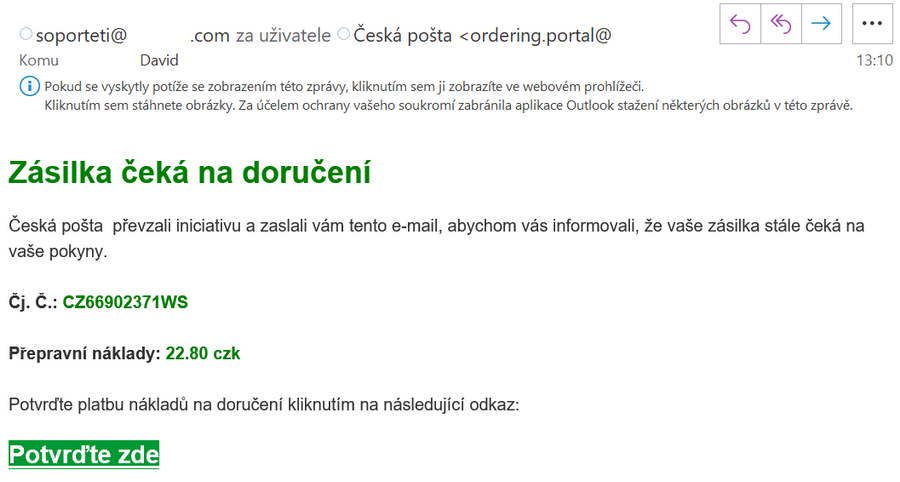
Illustrative image of a phishing email masquerading as information about a package from the Czech Post.
Source: NUKIB
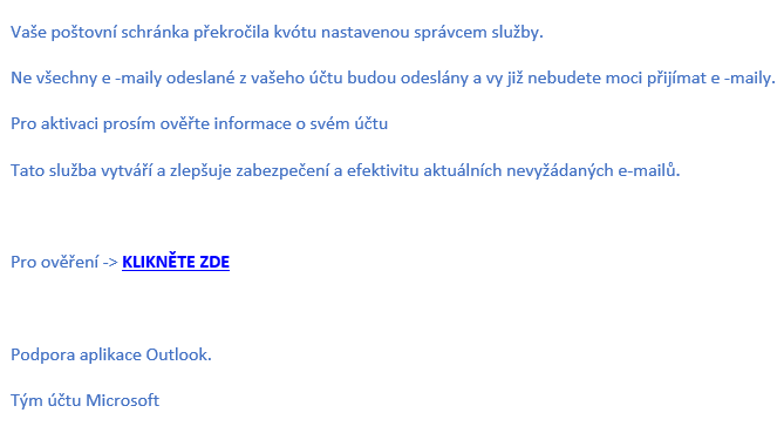
Illustrative image of a phishing email that masquerades as information about a user’s mailbox capacity being exceeded. Source: NUKIB
What other tricks do phishing messages use??
It makes sense that when a phishing message sounds authentic, it increases its effectiveness. That’s why attackers can tailor a message to the organization they’re targeting. All they need to do is explore the organization’s website. Imagine a public calendar that lists an open house. And imagine a recruitment page that lists the name of the HR manager. A phishing email asking the HR manager to help with an open house is ready. All they have to do is click the link, log in to the shared spreadsheet, and sign up to volunteer. Employees won’t find the message strange because the open house is really coming up.
Do phishing messages only go through email?
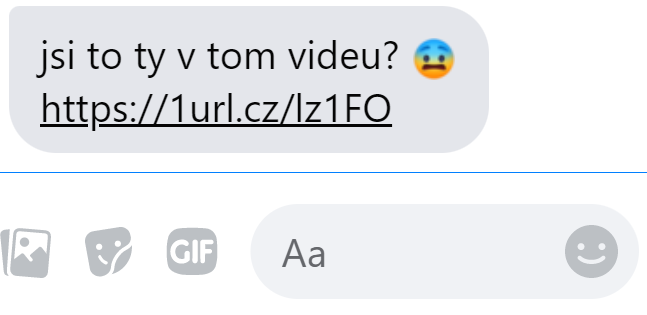
No, users can encounter them on social networks, for example. A good social engineering tool is to arouse the user’s curiosity. Imagine that someone you know sends you a short message in Messenger that says: “Is that you in the video?”, and there is a link attached to it. The worm is already gnawing at our conscience. We are surprised, a little afraid of when and where someone filmed us. When we open the link, we are redirected to the social network’s login page, which does not look anything special. But when we log in, we submit our login details.
Illustrative image of a phishing message masquerading as a message from an acquaintance.
Source: NUKIB
Phishing detection
It is important to be vigilant and not to underestimate phishing. If a user becomes the target of a simple phishing message, they have a chance of recognizing it because of the breakneck Czech. These messages tend to originate abroad and are automatically translated. The sender’s address is also a clue. If it is suspicious at first glance or ends with an unusual domain, for example .ru instead of .cz, it is worth paying attention. However, sophisticated phishing messages also come from trusted addresses. Therefore, it is necessary to be careful especially when clicking on any attached links in the email. In the case of sophisticated phishing, this is often the only clue that the user can focus on. Attackers also rely on the graphic form; if the user sees a familiar graphic, he is less suspicious. Attackers also like to put users in a time crunch, putting pressure on them to complete the task quickly.
What should I do if I recognize a phishing message?
It is important not to open the attached links. If we discover phishing only after opening the link, it is important not to fill out anything, not to log in anywhere. Then follow the internal rules of the IT policy, which you should be familiar with.
What link tricks do attackers use?
You’ve probably seen links hidden behind the word here or something similar. The text is more aesthetically pleasing, but attackers can confuse users. A useful tool is a preview window of the link’s target. If you hover over a link with your mouse and don’t click, the link’s target will appear in the lower left. Try it! Attackers also like to use anagrams and other tricks. For example, they will change the address microsoft to rnicrosoft, they will change the capital “i” to a lowercase “l”, there is no pharmacy like Iekarna.
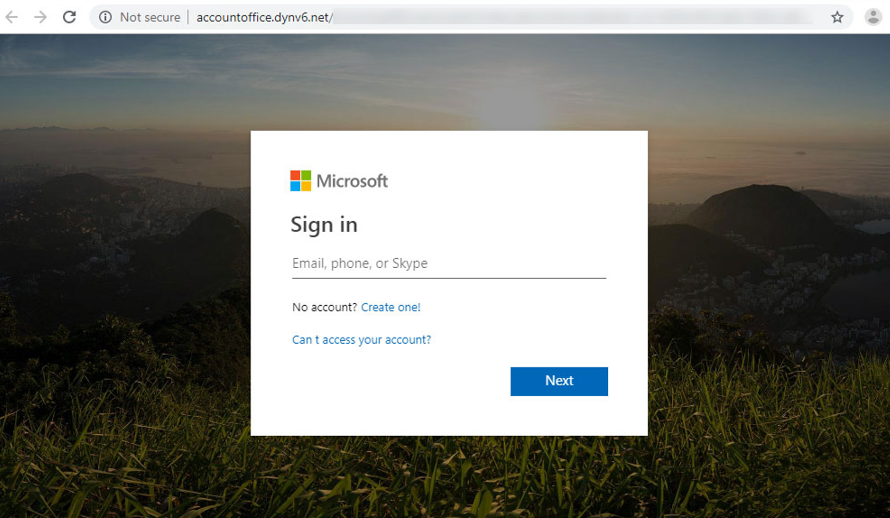
Illustrative image of a phishing email masquerading as a login window for Microsoft services.
Source: eset.com/cz/blog/prevence/phishing-stoji-za-tretinou-pruniku-jak-poznat-skodlive-e-maily/
Vishing
A social engineering technique that is on the rise. The intention is the same as with phishing, to lure the user into providing confidential, typically login, data. However, the execution is different. The manipulation takes place over the phone. For example, the attacker disguises himself as an IT department customer support representative and informs the user that he needs to verify his account. The pretext may be the leakage of employee login data and an attempt to mitigate the consequences. Employees often have a “sense of duty” and cooperate according to instructions. You might think that you would not do something like that. Don’t be mistaken. Attackers can create the impression of a trustworthy call center. They play a jingle on the receiver and easily transfer the user several times. There are also tools that ensure that the user sees a trusted number on the display.
How do I recognize a vishing call?
If you suspect something is amiss, use offensive rhetoric. Ask about things the caller would need to know if everything were true. Is the bank calling to say that our bank account is at risk of being blocked? In that case, ask how much money is in the account. Is technical support calling to say that our email account is at risk? Ask who is handling the matter in the IT department. Report suspicious calls to the IT department as well, as they could have a massive impact on the organization.
What other tricks do vishing calls use?
Attackers can call, for example, at night, when people are sleepy and it is easier to shock them and force them to cooperate. If the victim is not caught by the first call, a second call may come. In the first fraudulent call, the attackers pretend to be, for example, a bank, and in the second, the police, who are calling at the bank’s request. Also listen to the recording of the vishing call, published by the Seznam Zprávy server.
Baiting
A technique that targets users’ curiosity. Imagine finding a “flash drive” in the hallway or in a meeting room. Would you stick it in your computer? Of course not! But a lot can change when there is a label on this “flash drive”. For example, “list of employee layoffs” or “proposed annual bonuses”. According to surveys, two out of five employees connect a “flash drive” labeled in this way. And as you might guess, they often find something completely different than they expected. For example, a malicious file that will cause the IT department to take a vacation for a long time. The user doesn’t even have to open the malicious file, the attacker can rig everything so that it starts automatically after connecting to the device. And if you’re wondering how such a “flash drive” gets into the meeting room, a bribed employee could bring it here.
What other tricks with the “bottle” can I encounter?
There are known cases where a modified “flash drive” supplied electrical energy after being connected to a device and, once it had gained enough energy, sent it back to the device. This was able to destroy the device. There are “flash drives” that can make spy audio recordings, acting as a disguised dictaphone. A modified “flash drive” can also disguise itself as a keyboard, so even if the organization’s IT policy is set to prevent “flash drives” from being launched, this disguise can fool the settings and the flash drive will launch.
What should I do if I find a “bottle”?
Whatever the description, do not connect it to any device. Even if it has your organization’s logo or a tempting description of an Easter egg. Take it to the IT department and let them know where you found it. There may be more suspicious “bottles” lying around in the organization.
Risks of social networks
Most of us visit social networks at least occasionally. It is part of our modern world that we like to share moments from our personal or professional lives with friends. However, in the eyes of attackers, this can be valuable information that they can exploit when planning social engineering. Although it sounds like mundane advice, take care of your privacy and carefully check your posts. However, you should consider that the content you share becomes public. Be proactive. When sharing content, try to ask yourself: “What could be useful to an attacker?” It could be an address, a bank account number, a photo in front of a bulletin board, a photo from a meeting room, etc. If you discover something like this, try to think about how to edit the content.
How can my profile be abused?
One of the tricks that users encounter is identity theft. The attacker creates a copy of our profile based on publicly known information and contacts our friends, colleagues, etc. They try to get more information from them or steal their profiles. The attacker can then use the stolen profiles to send malicious messages or links or for disinformation campaigns. Based on the information published on the profile and the content we share, attackers can also create a database of words and use it to try to crack the password. This is called a dictionary attack.
What other tricks are lurking on the net?
One of the dead ends of cybersecurity was the so-called “security questions”. Users chose a question and could use the answer to it as a replacement password if they forgot their password, etc. This included, for example, their mother’s maiden name or the name of a favorite teacher from school. As you might guess, this information is searchable. In addition, fraudulent surveys or contests appear on social networks that focus on finding these answers. Users often do not realize this and voluntarily reveal the answer to their security question. It is better not to use this security method.
Pocket puller
| 1. Social engineering | 2. Phishing | 3. Vishing | 4. Baiting |
| Social engineering techniques focus on user manipulation. Their goal is to manipulate the user’s emotions and feelings so that, for example, they reveal their confidential, typically login, data. | It can look like a strange message from abroad or a subtle challenge from the IT department. It can be disguised as a notification about an overflowing email inbox, for example. It is important to monitor where the links lead. | A fraudulent technique that is usually carried out using a phone call. Attackers disguise themselves as bank or customer support staff, for example. Don’t be scared or derailed. | Popular flash drives can cause a lot of problems. Attackers will plant them and wait for someone to connect the flash drive to their device. It may have a tempting description. It is better to avoid them altogether. |