
7. Downloading applications
What should you be careful about when downloading and installing applications? Attackers rely on our inattention. What tricks do they use?
Did it happen?
Peter is 50 years old and works at the regional court, where he is responsible for the file service. When he received a smart mobile phone for his work duties, he decided to properly secure it. He downloaded and installed an antivirus program designed for phones from the official application source. Since it was an official application source, he chose only based on the number of application downloads. After installing the selected application, the phone required several restarts. Since phones restart when installing applications normally, Peter did not worry too much about it. However, after the last restart, Peter was seeing ads for lewd websites popping up everywhere, which he could not get rid of. Peter did not feel comfortable asking the IT department for help in this situation.
App stores
In addition to pre-installed applications, we can also download and install others on our phones. It is more than appropriate to use only official sources, so-called application stores. The word “store” may sound like payment, but the majority of applications are free. The official store for Android phones is Google Play. Android is used by many phone brands. The official store for iOS phones is the App Store. iOS is used only by Apple phones. Applications in the official store offer have passed a security check, but even that is not 100% secure. Sometimes a malicious application slips into the offer. Or exploitable flaws appear that were not known about. The trend is fictitious incentives to test developed applications with the promise of a reward. However, such applications have not yet passed any check and can be very dangerous. Malicious applications or parts of them are also offered by attackers on the black market. You may be surprised to learn that they even have their own product pages and marketing.
How do malicious applications manifest themselves?
They manifest themselves in various ways. Some block the phone, for example by changing the unlock PIN. Some work correctly at first glance, but do mischief in the background. For example, they capture and send to the attacker what we type on the keyboard and give him access to our SMS. In this way, it is possible to obtain the user’s login details, including the SMS code for two-factor authentication. Some flood the user with unwanted advertising. Others send hundreds of expensive MMS messages.
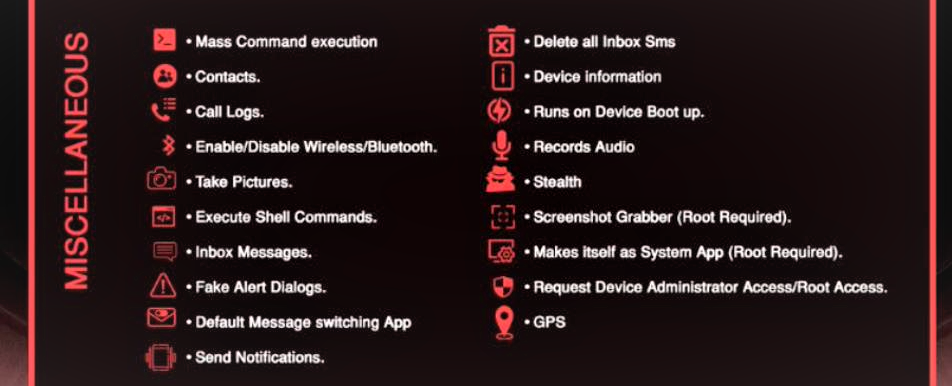
Ilustrační obrázek ukazuje propagační web a dovednosti škodlivé aplikace. Umí například smazat všechny SMS zprávy, nahrávat audiozáznam nebo zobrazovat podvodná upozornění.
Source: forbes.cz/jestli-mate-v-telefonu-tyhle-aplikace-okamzite-je-smazte-chytili-jste-trojsky-kun-rogue/
Application selection
There is no list of applications that we should not download. In a few minutes, they would be out of date. That is why it is important to check applications before installing them. Malicious applications can also be disguised as applications that are used to edit photos, or as an antivirus program that we do not expect to be malicious. We should always monitor the ratings and reviews of other users before downloading an application. It is worth filtering out bad ratings and reviews and seeing what the dissatisfaction is about. If they are okay, it is a good idea to think about what permissions the application requires on the phone when installing it.
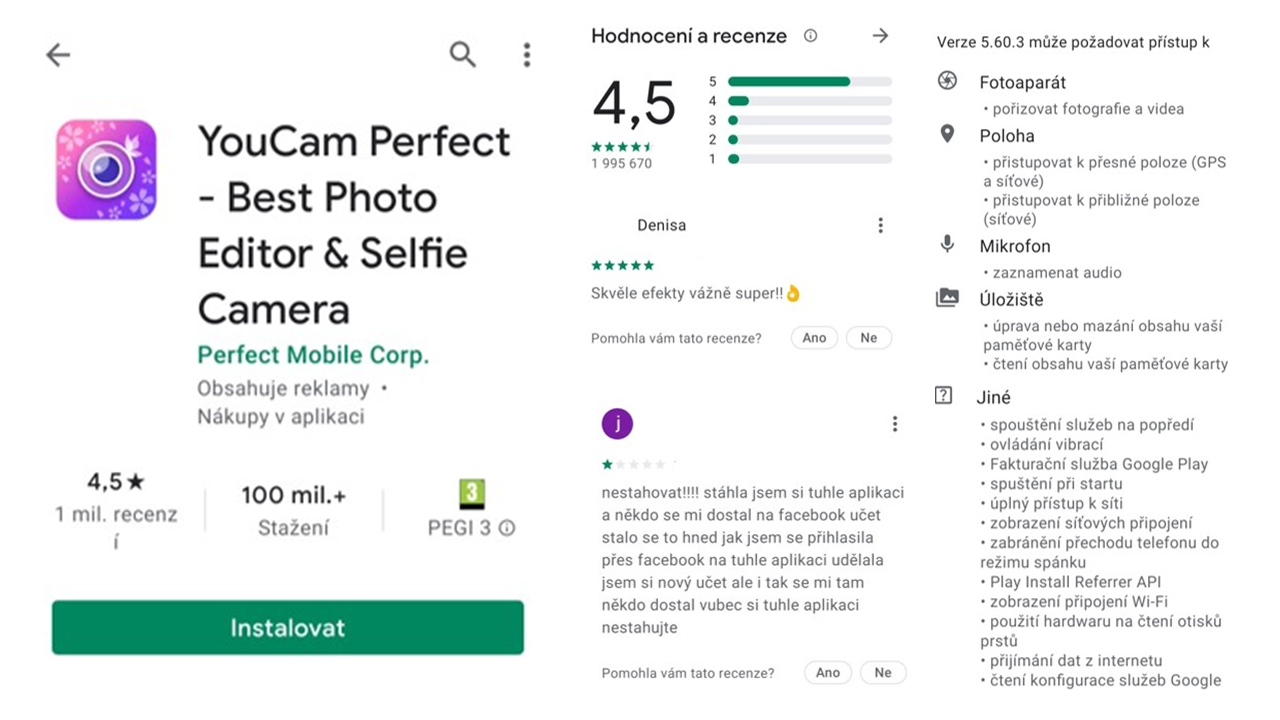
Ilustrační obrázek ukazuje podezřelou aplikaci a její hodnocení. Na aplikaci upozorňoval mj. článek: idnes.cz/mobil/aplikace/zkrasleni-mobilni-aplikace-malware-spehovani-spyware.A200124_102127_aplikace_LHR
Zdroj: NÚKIB
App permissions
Again, permissions are not bad in themselves. Without the appropriate permissions, an app cannot function. A photo editing app that doesn’t have access to the gallery won’t live up to expectations. Nor will a navigation app that doesn’t have access to your location. But is it okay for a music app to require access to messages? The truth is that checking permissions is becoming more complicated for users. In an age where we can control our phones with our voices, it may be okay for a calendar to want access to the microphone. That’s why Android and iOS developers are trying to help us. But it’s a tricky situation for them too. If an app kept asking for everything it wanted to do, users wouldn’t use it. They would resort to apps that would be more convenient, even if they were less secure. Developers are therefore looking for a middle ground. For example, when an app forces the microphone to be turned on, a dot appears that means “be careful, microphone is running.”
Pocket puller
| 1. Official stores | 2. Application criteria | 3. App permissions | 4. App Masking |
| When we download applications to mobile devices, we should always download them from so-called official stores. That is Google Play for Android and AppStore for iOS. They are official sources. | It’s important to monitor user reviews and ratings for apps. It’s worth filtering out the bad reviews and looking at what specific things users complained about. That’s a good guide. | Every application needs so-called permissions to function. As users, we grant them. However, we should grant permissions with discretion and evaluate them with common sense. | Attackers often insert malicious code into an application that users don’t expect. For example, a photo editing application that spreads well. Or an application that pretends to be “antivirus protection.” |