
1. Passwords and logins
Finally, practical advice for managing user passwords! How to manage passwords on the Internet comfortably but securely?
Did it happen?
Bohdan is 38 years old and works as a clerk in the education department of an unspecified municipality. To simplify his work, he wrote down his login names and passwords in an Excel spreadsheet. He created a record so that he wouldn’t have to remember them. And because he visited this record often, he had it saved directly on his desktop. Before the start of the school year, he sent all the school principals in the region new instructions for creating statistical reports. He sent the instructions as separate instructions attached to a mass email. When the principals started to point out to him that he had sent them something in the attachment that clearly didn’t belong there, he got angry. He was lucky, no one took advantage of the situation. But he preferred to get rid of the Excel record and started looking for a more secure solution.
Secure passwords
Online services and portals nowadays require the user to choose a relatively secure password. Passwords like “jindrich38” are often not possible to set. Protection mechanisms ensure that the password has a certain number of characters, usually at least 12, and contains uppercase and lowercase letters, numbers, and special symbols such as +*?-. This is considered a good standard. Users should pay attention to predictable positions. When a capital letter is placed at the beginning and numbers at the end of the password, it makes the attacker’s job easier. Predictable positions reduce the number of combinations they have to try. It’s like locking up and putting the key under the doormat. It’s a good idea to be more creative when creating a password. It’s also worth noting that experts currently consider password length to be the most important security factor.
Phrase passwords
Phrase passwords have an advantage. They are easier to remember because they are creative. A password does not have to be just a string of random characters. It can function as a memory aid that the user can work with. A memory aid can be anything, such as a book you have in front of you in the library. For example, Mr. Brouček’s New Epoch Trip, this time to the 15th century. Now all you have to do is determine and remember the key according to which we compose the password. A phrase password can have the following form: Mr. Brouček’s New Epoch Trip, this time to the 15th century, i.e. NevpB,td15.s. Below you can see how long it would take to crack this password. However, we do not recommend entering real and current passwords into similar websites for orientation testing. If you are interested, always enter passwords that are similar in character.
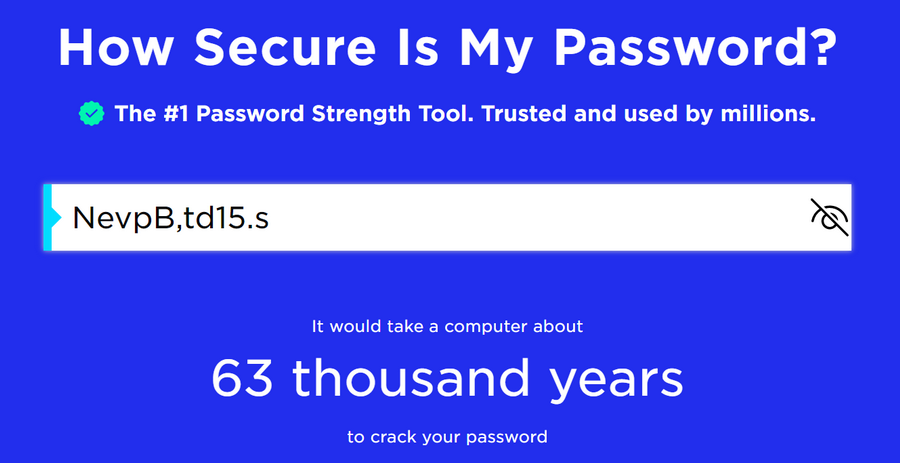
The illustration shows a rough calculation of the time required to crack a model passphrase. In this case, it would take up to 63,000 years. However, it depends on the computing power of the attack.
Zdroj: security.org/how-secure-is-my-password/
Password manager
Password managers are computer programs that can take the stress out of users. There are several ways in which users can work with password managers. Typically, a password manager can generate passwords, store them in a secure, encrypted location, and provide passwords to the user when needed. Some users do not store passwords in the password manager, but only mnemonics and keys to passphrase passwords. The user only remembers a “superpassword” that starts the password manager. It is said that there are only two passwords that do not belong in a password manager. The password for e-mail and the password for online banking.
Can you recommend a password manager?
The KeePass password manager deserves a recommendation. It’s not a hottie, but it has its advantages. It’s open-source, which means that the KeePass program code is developed by a global community of programmers. Its code is publicly known and transparent. To prevent anyone from adding a malicious part to the program code, there are a number of protection mechanisms and approval processes. That’s why cybersecurity experts usually trust open-source solutions more. KeePass runs as an offline file without access to the Internet, which is also its plus. However, it’s a good idea to duplicate this file and save a copy of it in a safe place, for example in case the original password file gets damaged. It also has a Czech version. It’s not commercial, it’s free.
What about the “remember password” feature offered by web browsers?
The technical solution for this function varies between web browsers. However, it is generally not a very secure function, as there are several ways to remotely steal saved passwords. The solution in the Safari web browser can be considered relatively safe . The solution in the Mozilla Firefox web browser is also among the safer ones if the user sets a so-called master password to protect all other passwords. However, note that even the official instructions, which you can find in the links above, mention the risks associated with this solution.
Credential leaks
User passwords can be leaked directly to an online service. The service should not store passwords in plain text, i.e. in the form known to the user. It should not know that the user has the password NevpB,td15.s. However, many services do not respect this, thereby endangering users. The online service should only know a surrogate string for the password created using a mathematical function. Such a string is called a hash and looks like this: 034f79995f34f8529e68a97b4873deaadf1350ab. The password and its hash are like identical twins. They are the same, but still different. In the event of a data leak, “only” the hash should be leaked. However, if the service uses outdated hashing functions, we are in trouble again. There are tools that can break such hashes. That is why it is important to put a little effort into creating a password and also to change it regularly.
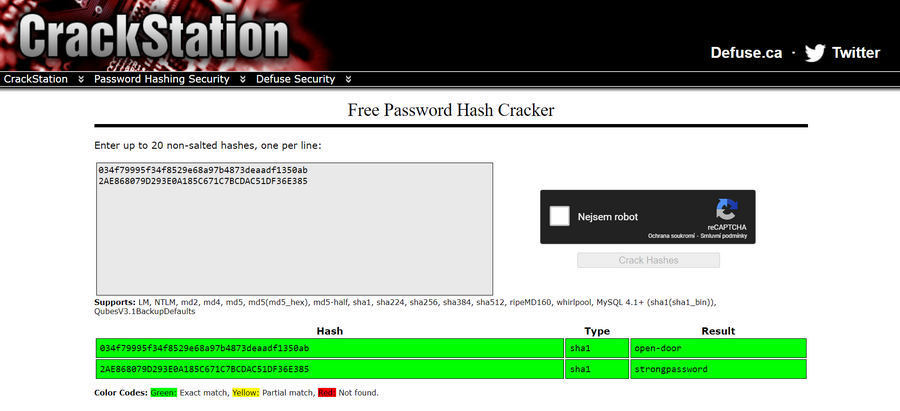
The illustration shows a tool for cracking a hash of a plaintext password. For example, hash 034f79995f34f8529e68a97b4873deaadf1350ab represents the password open-door. However, it cannot be claimed that every hash can be cracked in this way. Source: crackstation.net
Two-factor authentication
Two-factor authentication is a lifeline if someone else gets hold of your password. We recommend setting it up wherever possible. It most often takes the form of an SMS code with a time-limited validity, or a prompt in the relevant mobile application. When logging into an online service, the user enters their login name, password and must also copy the SMS code or confirm the prompt in the application. This is the second factor. Authentication using SMS codes is slowly being phased out because SMS are not encrypted and it is not difficult to eavesdrop on them. Prompts in a mobile application tend to be more trustworthy. They usually use encryption and increasingly use biometric data, such as the user’s fingerprint. If you can, choose authentication via mobile applications.
Does two-factor authentication have any weaknesses?
The effectiveness of this verification is reduced by a relatively subtle thing in the phone settings. SMS message previews. If the user uses an SMS code as a second factor, they should disable message previews on a locked device in the settings. If this is not disabled, anyone who has access to the phone can get the SMS code without having to unlock it.
What if I have two-factor authentication enabled and I lose my phone?
For these cases, users are given so-called backup codes. They can be in the form of a numeric code, QR code, etc. It is a good idea to store these backup codes safely, ideally offline. The problem can arise if an attacker gets hold of these codes. This can happen if the user has them carelessly stored somewhere on their device. If the attacker obtains the codes, the service will consider them to be a verified user who, for example, has lost their phone.
Pocket puller
| 1. Password format | 2. Password length | 3. Phrase passwords | 4. Password Manager |
| A password can contain uppercase and lowercase letters, numbers, and special symbols such as +*?- etc. It is advisable not to put a capital letter at the beginning and a number at the end of the password. These are predictable positions. | A good password is at least 12 characters long. Cybersecurity experts say that password length is the most important factor in resisting password cracking techniques. | Our brains can be helped by so-called phrase passwords. They work as a good memory aid. Remember Mr. Brouček’s New Epoch Trip, this time to the 15th century, i.e. NevpB,td15.s. | Password managers are handy programs that generate passwords, store them in a secure location, and issue them to the user when needed. Experts recommend Keepass as a good password manager. |