
5. Malicious files
You might be surprised to learn that even a Word or Excel file can be dangerous. Here’s how attackers can exploit them.
Did it happen?
Radek is 44 years old and works as an accountant for an unspecified tax office. He processes dozens of documents that come to him by e-mail. Most often in the form of Excel tables. When he opened one of the tables, a prompt appeared to allow so-called macros. The prompt stated that macros would ensure the correct functioning of formulas. Since Radek knows Excel well, the message did not surprise him and he enabled macros. Subsequently, his computer slowed down. But because the computer was older, he did not attach importance to it. He decided that if the technician was on strike, he would leave earlier and finish the work in the morning. However, in the morning, the accounting systems that he normally works with did not start. After his colleagues arrived, he discovered that he was not alone. While troubleshooting the problem, it was discovered that the enabled macro was behind everything.
Malicious files
Malicious files sent as email attachments are a popular trick for attackers. Because users process attachments like they’re on a conveyor belt, attackers are often lucky enough to have someone download and open their malicious file. The worst are so-called executable files. Perhaps the most well-known executable file has the extension .exe. It should be noted that executable files are not bad in themselves. They are used, for example, to install programs on a computer. However, attackers can abuse them. They prepare an executable file, the user opens it, and thus installs a malicious program on their device. In the workplace, it is customary that ordinary users cannot run these files, they do not have the permission to do so. Ideally, such a file should not even get through the filters. However, sometimes such a file does get through.
Masking malicious files
To increase the likelihood that a user will open and run a malicious file, attackers disguise it. It can be hidden, for example, in an archive that can pack multiple files into one. Archives most often have the extensions .rar or .zip, for example, faktura.zip. Again, archives are not bad in themselves, but as users we should approach them with caution. There may be a black Peter hiding there, for example faktura.exe. And it may not be obvious at first glance. Extensions can also be hidden in different ways. This means that we see the file obrazek.jpg, but in fact it is skodlivysoubor.exe.
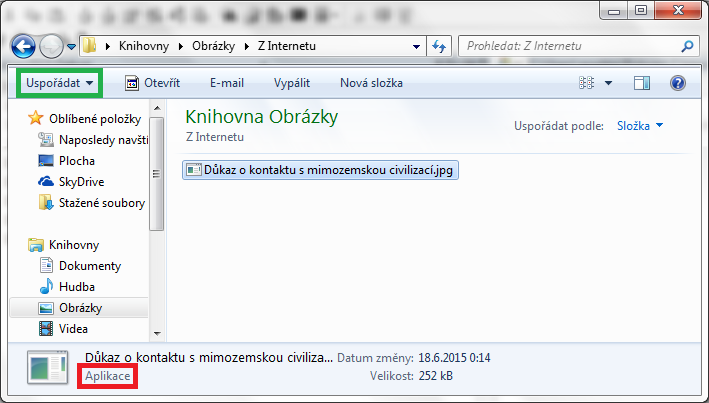
The illustrative image shows a malicious executable file that is disguised with an image extension. (Part 1).
Source: support.zcu.cz/index.php/Skrývání_přípon_v_systémech_Windows
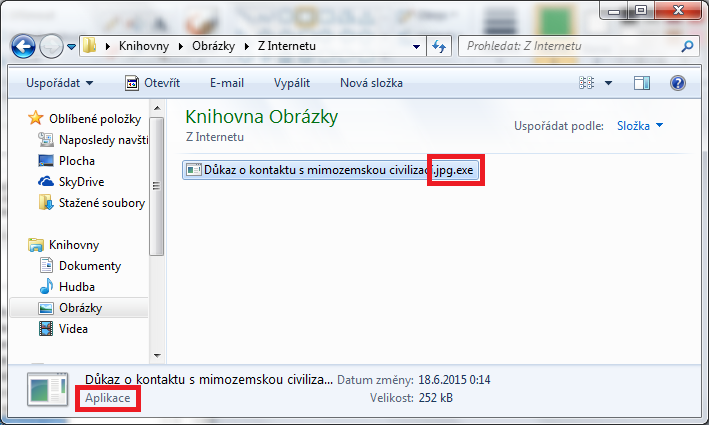
Illustrative image showing a malicious executable file that is disguised with an image extension. (Part 2).
Source: support.zcu.cz/index.php/Skrývání_přípon_v_systémech_Windows
Macros
Users are often surprised that files from the Microsoft Office suite, such as the aforementioned Excel, Word, or PowerPoint, can also be dangerous. According to available data from the Czech Republic, these files can cause havoc. Especially if we, as users, allow the launch of so-called macros. Macros are advanced sets of rules that we can create to perform repetitive tasks for us. Again, they are not bad in themselves. And again, attackers can abuse them. They can tell the macro: “Download this malicious file from this link, wait in hiding for this, and then do this.” That is why Microsoft decided to disable macros in the basic settings and the user must enable them themselves. If you do not know the history of a file that requires macros to be enabled, do not enable it. In the images below, note that files with a macro have the extension .docm, without a macro .docx, it works similarly here with Excel or PowerPoint. “M” for “macro”.

Illustrative image of the Protected View bar.
Soure: servis.eset.cz/knowledgebase/article/View/596/0/jak-zabranit-spoustni-maker-v-dokumentech-stazenych-z-internetu

Illustrative image of the toolbar that allows you to enable and run a macro.
Source: servis.eset.cz/knowledgebase/article/View/596/0/jak-zabranit-spoustni-maker-v-dokumentech-stazenych-z-internetu
Ransomware
Malicious files can carry and run malicious programs. Ransomware is a malicious program that encrypts data, files, or entire systems so that users and administrators cannot access them. It then demands a ransom for decryption. Ransomware usually asks for a ransom when nothing works anymore. If it is a company or a hospital, it will come under enormous pressure. Imagine that even an X-ray does not work, human lives are at stake and paying the ransom seems like the quickest solution. However, it is generally recommended not to pay the ransom. How does such a malicious program reach an ordinary user? For example, as a file attached to an email or on a “flash drive”. If we unfortunately open such a file and manage to recognize ransomware, the only useful advice is to immediately turn off the entire device or unplug it directly from the outlet.
Why is it recommended not to pay the ransom?
Previously, attackers increased the motivation to pay the ransom by promising that they would decrypt everything after payment. This was the “etiquette” of attackers, who often provided decryption keys after paying the ransom. They did this, among other things, so that people would know that paying the ransom made sense. However, not all attackers adhere to this “etiquette”, so it was generally recommended not to pay the ransom, but to ask for help from reputable experts and pay them instead. Therefore, multi-level extortion began, for example by threatening to publish all data. For example, health records. There are even “RaaS” services on the black market, Ransomware as a Service, which can be purchased for a few dozen dollars. This is used, for example, for competitive purposes.
Are there any preventive measures against ransomware?
The security community agrees that regular, preferably automated, backups are an effective way to prevent ransomware. If you have important files stored off-device so you can restore them if necessary, you have a big advantage. However, don’t forget to test your backups from time to time so that they don’t turn out to be broken if necessary.
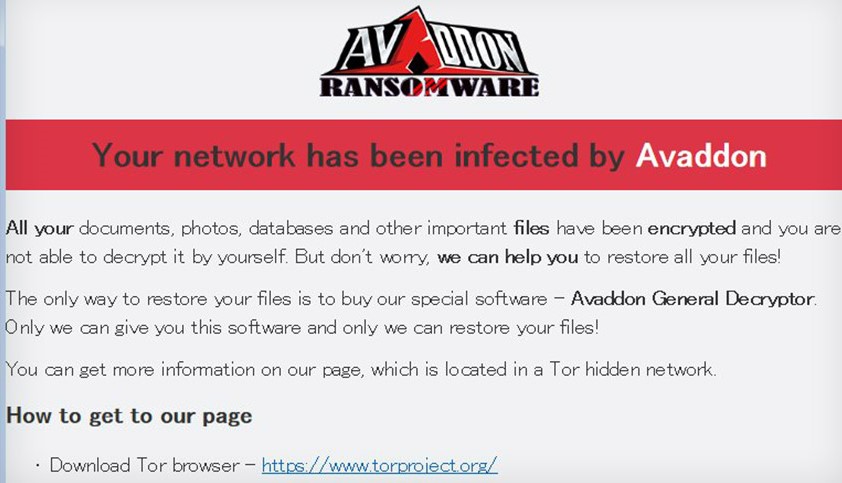
The illustration shows what a ransomware screen that demands a ransom looks like.
Source: bankinfosecurity.com/blogs/avaddon-ransomware-operation-call-quits-releases-keys-p-3057
Pocket puller
| 1. Malicious files | 2. File Masking | 3. Malicious macros | 4. Ransomware |
| Malicious files typically launch malicious programs that can damage our device or system. Attackers like to spread them in email attachments or via online repositories. | To confuse users, attackers disguise malicious files as an invoice or other important document, as one of many files in a .rar or .zip archive, or they camouflage file extensions. | It is often surprising to users that a malicious file can also be an Excel, Word or PowerPoint file. Attackers can prepare malicious macros in them, a set of advanced rules that can launch an attack. | A feared malicious program that can surprise users, perhaps because of a macro, is ransomware. It can encrypt files or entire systems, making them difficult to recover. |